Section 2 · Personas
Priya, the finance lead
Her goals and frustrations, so every later finding is judged against a real person.
UI/UX Design / UX Audit Report
A UX audit report checks a product through seven lenses, from business goals to design-system consistency, and ends in a ranked list of fixes. Our free 13-page guide shows a worked example of each section. Open PDF, no email. From WowMakers in Kochi, India: your strategic design partner, designing since 2011.
15 years of product, web and brand work for clients in India and abroad.


Worked examples
An example audit of one product, an expense app's sign-up flow, with one figure for each section. The first section, business objectives, sets what the rest is measured against: here, the share of visitors who finish sign-up. The free guide walks through the same seven sections with its own examples.
Section 2 · Personas
Her goals and frustrations, so every later finding is judged against a real person.
Section 3 · Behaviour
Where visitors drop out, with the numbers: here, email verification loses 41 points.
Section 4 · Heuristics
Tested against the first of Nielsen's 10 heuristics: does the product tell people what is going on? Here it does not.
Section 5 · Attitude
Features and usability scores side by side, to show where expectations are set.
Section 6 · Design system
The same action styled three ways on three screens, so inconsistencies stand out.
Section 7 · Fixes
Every finding becomes a fix, ranked by impact and effort, so the team knows what to change first.
The template
Seven sections, each answering one question. The first six collect evidence. The seventh ranks every finding by impact and effort, and ties it back to the business objectives in section one.
Use the table below as a template for your own report.
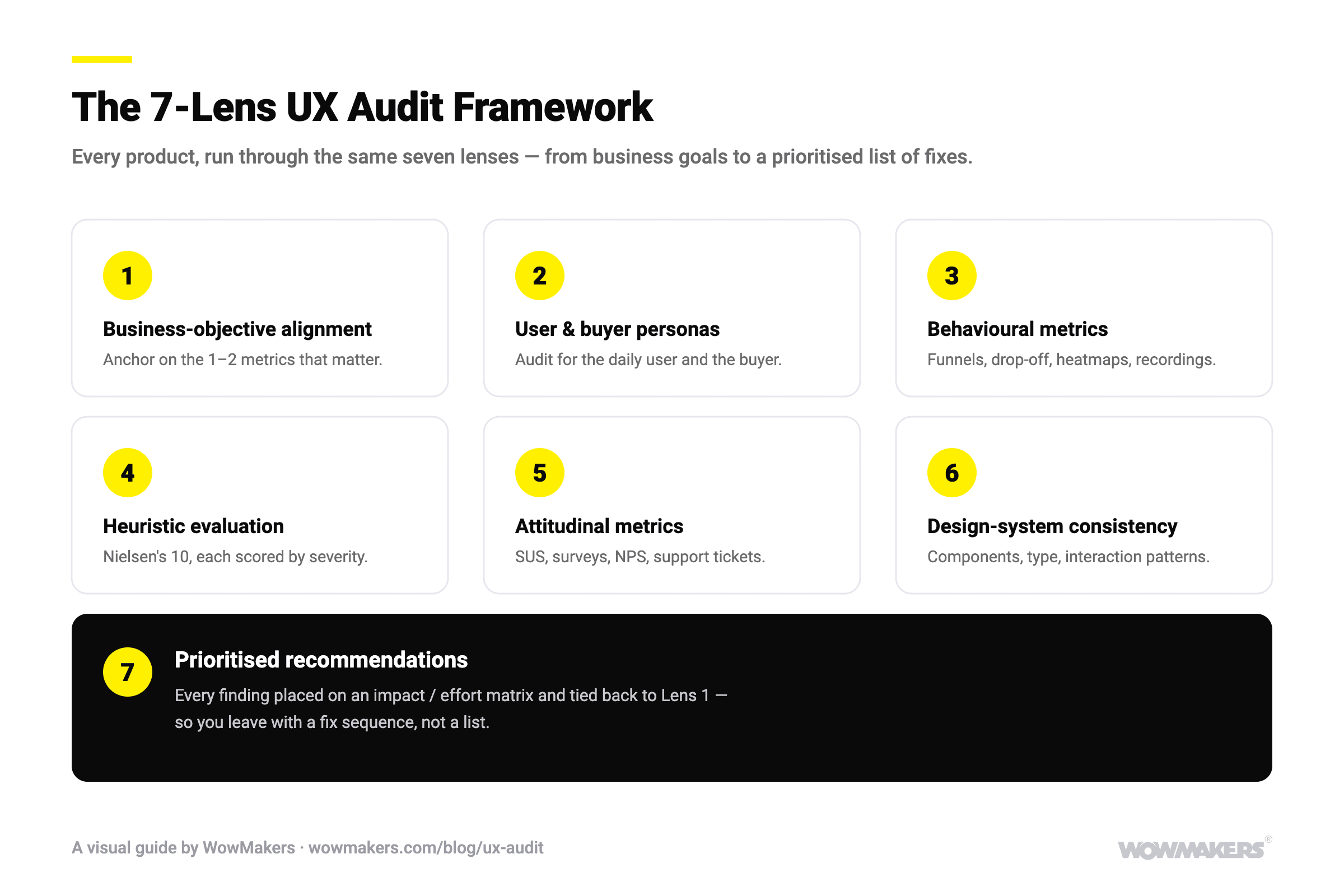
| Section | The question it answers | Evidence used | What the section contains |
|---|---|---|---|
| 1. Business objectives | What should the product achieve? | Your goals and KPIs, stakeholder interviews | The one or two metrics the audit measures against |
| 2. User and buyer personas | Who is it for, and is that who uses it? | Analytics, interviews, existing research | Personas for the daily user and the buyer |
| 3. Behavioural metrics | What do people actually do? | Funnels, drop-off, heatmaps, session recordings | Where people drop off, with the data |
| 4. Heuristic evaluation | Where does the interface get in the way? | An expert walkthrough against Nielsen's 10 usability heuristics | Each problem with a screenshot, scored by severity |
| 5. Attitudinal metrics | What do people say and feel? | Surveys, SUS and NPS scores, support tickets, competitor products | Satisfaction scores and the gaps against competitors |
| 6. Design-system consistency | Do the parts look and behave the same? | Colours, typography, assets and components | Inconsistencies, broken elements and accessibility problems |
| 7. Prioritised recommendations | What should we fix first? | Every finding above, on an impact and effort matrix | A ranked list of fixes, tied back to the business objectives |
What you get
The guide shows the structure. A real audit fills it in for your product.
Why teams choose us
Positioning first
We measure the product against what it has to achieve for the business. 15 years of brand and product work sit behind those calls.
Craft, amplified
AI helps us cover more screens and more feedback in less time. A senior designer decides what is a problem and how much it matters.
One studio
The team that finds the problem can design the fix, and the brand, film and website that sit around it.
How we work
We design the brief before we design the deliverable. Every audit starts with your goals, then moves to the screens.
We start from your business objectives and who your users are, so the audit measures what matters to them.
Behavioural metrics for what people do, attitudinal metrics for what they say, and a look at competitors.
A heuristic walkthrough and a design-system review, screen by screen, from the user's side.
Every finding rolls up into one prioritised list. If the brief is not the whole story, we say so early.
AI in the work
Craft leads, AI amplifies. Here is where each one sits in an audit.
AI · breadth
AI helps us scan every screen and state for candidate issues, so more of the product gets checked before the expert review.
AI · synthesis
AI clusters survey answers, reviews and support tickets into themes. A researcher reads the source before a theme is reported.
AI · checks
Automated contrast and focus-order checks run before the expert review, so people spend their time on judgment.
Human · judgment
Severity, trade-offs and the order of fixes stay with our designers. A model cannot know which problem costs you customers.
Is it right for you?
A good fit
A live product is losing sign-ups, sales or users and nobody can say exactly where, or you are about to redesign and want to keep what already works.
Not a fit
You already know the problem flow and need to see real people use it: run a usability test. Or the product is not live yet: start with research and design. Our UI/UX design team does both.
Meet the leads
These leads scope your audit and review the report before it ships.
Design That Compounds
One studio for product, brand and video, so the fixes look and sound like the rest of your brand.
FAQ
The questions product and design teams ask about UX audit reports. For how to run an audit yourself, read our complete guide to UX audits.
A UX audit report is the written result of a UX audit: a structured review of how a product performs for its business goals and its users, ending in a ranked list of fixes. It turns a vague sense that something is wrong into documented findings, each with evidence and a suggested change.
Our reports have seven sections: (1) business objectives, (2) user and buyer personas, (3) behavioural metrics, (4) heuristic evaluation, (5) attitudinal metrics, (6) design-system consistency, (7) prioritised recommendations. Each section answers one question, and the last one ranks every finding by impact and effort.
Yes. Use the seven sections in the table on this page as your template: for each one, write the question it answers, the evidence you used and what you found. There is no single prescribed template, and the metrics change with the product, but this structure keeps every finding tied to a business goal.
Yes. Our free 13-page guide walks through every section of a UX audit report with a worked example of each: a persona, a heatmap, a heuristic check of Google Drive, a competitor review, a design-system review and a ranked fix. It is an open PDF download, with no email required.
A full report is usually 30 to 50 pages. Most of that is screenshots, charts and annotated screens, because visual evidence is faster to act on than prose.
A shareable PDF, with each section laid out clearly and the prioritised recommendations at the end, so your team can act on it directly. An editable version is available on request.
Most audits take one to three weeks, depending on the number of flows and platforms in scope. You get the full report at the end, with the ranked fixes ready to work from.
Our prices are on our UX audit services page. A single flow costs less than a product on web, iOS and Android, and every audit gets one fixed quote before work starts.
A UX audit is an expert review that combines behavioural data, attitudinal data and a heuristic evaluation. Usability testing watches real people try to complete tasks. They work together: many teams start with an audit to find where to look, then test the riskiest flows with users.
Yes, in part. Contrast, focus order, labels and broken states come up in the heuristic and design-system sections, and the fixes go into the ranked list. If you need a formal WCAG conformance report, say so at the start, because it needs its own test plan.
Audit in-house if your team has time and can look at the product with fresh eyes. Hire outside help when the people who built it are too close to it, or when you need data from several sources weighed against each other.
Your team works through the ranked list, starting with high-impact, low-effort fixes. If you want help, the same team that ran the audit can design the fixes.
For the record
A UX audit report documents how a product performs for its business goals and its users, in seven sections: business objectives, user and buyer personas, behavioural metrics, heuristic evaluation, attitudinal metrics, design-system consistency and prioritised recommendations. A full report usually runs 30 to 50 pages and takes one to three weeks. WowMakers is a design studio in Kochi, India, designing products, brands and films since 2011. We run UX audits of live web and mobile products, on their own or as the first step of a redesign, and publish a free 13-page guide with a worked example of every section.
Updated November 2026.
Work with us
Tell us what the product does and where it is losing people. We will come back with a scope and a fixed quote.
Or download the free guide and see our UI/UX design work.